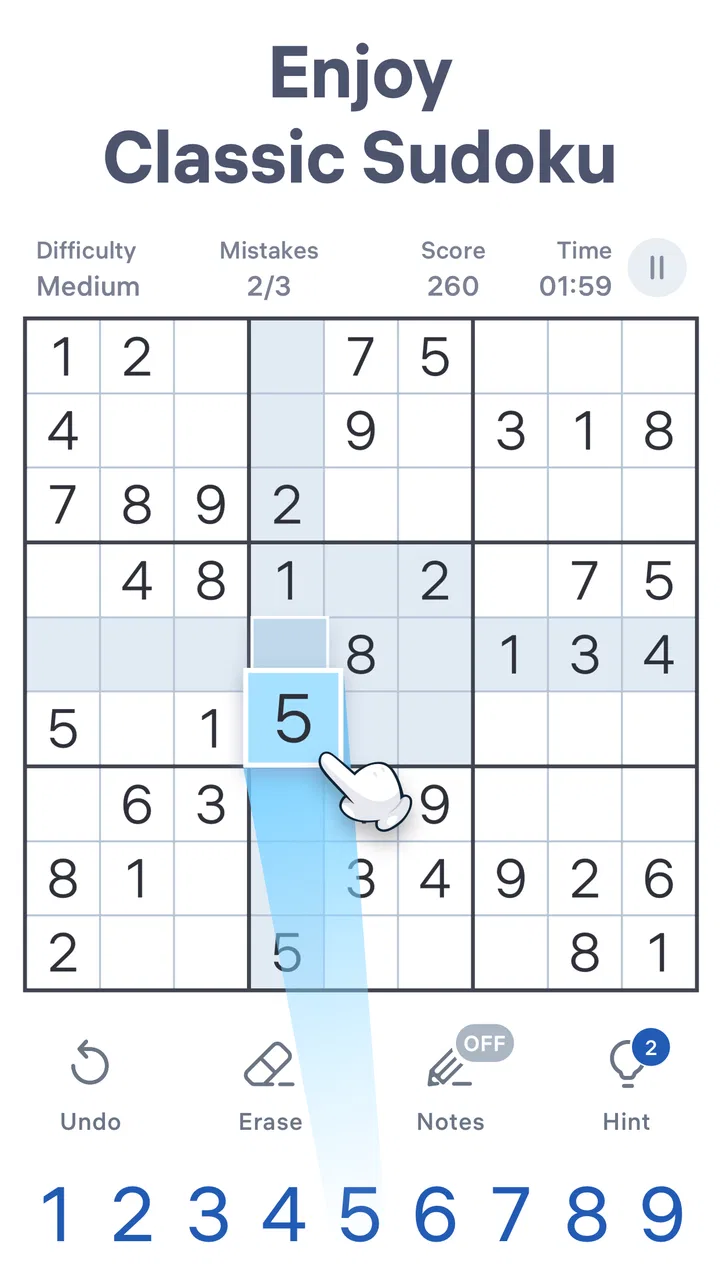
Sudoku.com - Sudoku Puzzle
- 4.7
- Rating
- 100.00M
- Installs
- Free
- Price

 Analysis by App-foxy
I spent time with Sudoku.com - Classic Sudoku as a quick daily puzzle rather than treating it like a game that demands long sessions. That distinction matters. This is a free number puzzle from Easybrain, built around the familiar Sudoku rules, and its greatest strength is how easily it fits into small gaps in the day. I can open it for a few minutes, work through a grid at my own pace, and stop without losing the simple thread of the experience.
My overall view is positive, but not uncritical: this is one of the more approachable ways to keep a Sudoku habit on a phone, especially if I want guidance and a steady supply of puzzles. It is less convincing for someone who wants a completely distraction-free paper-like experience, highly specialized solving tools, or a puzzle platform centered on deep competition. The app succeeds because it makes the classic format comfortable, not because it reinvents it.
Why the familiar format works so well on a phone
The central appeal is immediate recognition. I do not have to learn a new board, understand a story, or memorize a collection of special rules before starting. The objective is to place digits so that each row, column, and box contains the required set without repetition. That simplicity makes the game easy to recommend to a friend who wants something mentally active but not exhausting.
You May Also Like

 Blood Strike: 2.5 Anniversary
Blood Strike’s Loadouts Turn Every Drop Into a Tactical Gamble
A close look at Blood Strike’s custom loadouts: how fast access to signature weapons reshapes its battle royale rhythm, rewards preparation, and narrows the gap between fights.

 Pandora - Music & Podcasts
Pandora’s Music Is Easy to Start, but Harder to Recover
Pandora’s strength is its low-effort path from a seed to a station. Its weak spot is how much confidence it asks you to place in connection, setup, and quiet recovery.

 8 Ball Pool
8 Ball Pool Is Built on Rivalries, Rematches, and Routine
A close look at the rivalries, rematches, shared routines, and unanswered safety questions that turn a quick pool match into a persistent mobile community.

 Samsung Music
Samsung Music’s Quiet Strength Is Playing What You Already Own
Its reach comes less from spectacle than from dependable access to a personal library. That simplicity is both the app’s strongest retention engine and its ceiling.

 AccuWeather: Weather Radar
AccuWeather Review: A Quick, Clear Forecast for Everyday Decisions
For everyday plans, the best forecast is the one you can understand quickly. AccuWeather makes rain timing, radar, and local conditions easy to act on, with a few trade-offs.

 Hill Climb Racing
Why Hill Climb Racing Still Turns Crashes Into One More Run
A tiny car, a bumpy hill and one more upgrade: Hill Climb Racing keeps resurfacing because its simple chaos makes every near-miss feel personal.
More From Our News Desk
View All News


Sudoku.com is listed as a puzzle game, and that description fits its role better than calling it a general brain-training package. The useful mental work comes from narrowing possibilities, spotting relationships, and resisting guesses. I find the best sessions are the ones where I slow down enough to test a deduction instead of tapping the first number that seems plausible.
The interface is particularly well suited to short sessions. A phone screen gives each grid enough room to read without requiring a desk, notebook, or pencil. When I have a spare moment while waiting for an appointment or winding down before bed, a single puzzle feels like a complete activity rather than an endless feed. That contained structure is a real advantage over mobile games designed to keep pulling me into another round.
The daily-puzzle focus also gives the app a useful rhythm. I can make one puzzle part of a morning routine, use it as a break between tasks, or return to it when I want something quieter than a fast arcade game. It does not require a large block of free time, and the classic rules make it possible to resume after an interruption without relearning a complicated objective.
One practical tip is to treat the grid as a reasoning exercise rather than a speed test. I first scan for rows, columns, or boxes that are nearly complete, then look for digits that have only one possible position. After that, I check the consequences of each placement. This approach makes the game more satisfying and reduces the temptation to rely on random tapping.
A gentle entry point for new solvers
For someone who has only seen Sudoku in newspapers, the app offers a less intimidating starting point than a printed puzzle book. A phone can make the board feel cleaner, and digital input removes the frustration of erasing pencil marks repeatedly. That convenience is important for beginners, because early mistakes can otherwise make the whole activity feel harder than it really is.
I also like that the format can serve different moods. A beginner can focus on obvious placements and gradually develop a method, while a more experienced player can use the same basic board as a compact logic workout. The experience does not depend on reflexes, visual effects, or a large collection of characters, so the attention stays on the puzzle itself.
That said, the app is not a substitute for learning Sudoku technique if the player wants to improve seriously. It gives me a place to practice, but progress still comes from understanding candidates, pairs, intersections, and the difference between a deduction and a guess. The most useful habit is to pause whenever I feel forced to guess and inspect the affected row, column, and box again.
What makes it useful beyond a casual time-filler
The strongest evidence for its value is how naturally it supports repeatable practice. A single puzzle can be approached in stages: first identify easy placements, then mark possible candidates mentally or through the available input tools, and finally revisit unresolved areas after every confirmed number. This workflow turns a vague challenge into a sequence of manageable checks.
Another non-obvious benefit is that the game encourages error awareness. When I make a poor choice, the resulting conflict can reveal where my reasoning went wrong. That is more useful than simply being told that a move failed, because it pushes me to ask whether I overlooked an existing digit or assumed a possibility without proof. Players who use that feedback deliberately can improve their solving discipline instead of merely finishing more boards.
I would also use it as a transition activity. After a long period of reading or screen-heavy work, a quiet grid gives me a defined task with a different kind of attention. It is not relaxation for everyone; some people find logic puzzles demanding. For me, though, the limited scope is helpful because it replaces passive scrolling with a goal that has a clear endpoint.
The app has attracted a large audience, with over one hundred million installs and a 4.7 average from around two million ratings. Those figures do not prove that every player will enjoy it, but they do reflect how broadly the straightforward mobile Sudoku format appeals. The developer, Easybrain, has clearly positioned this as an accessible mainstream game rather than a niche tool for tournament specialists.
The friction I noticed while playing
The main limitation is that the experience is still a mobile free-to-play product. The game itself costs nothing to start, which makes trying it easy, but the presence of in-app purchases means the surrounding experience may not feel as minimal as a paper book or a dedicated offline puzzle device. Purchasable items range from $2.49 to $14.99 each, so anyone who wants a completely uncomplicated setup should pay attention to the way the app presents optional spending.
This is not a criticism of the Sudoku rules themselves. It is a difference in atmosphere. A printed collection gives me a fixed set of pages with no digital interruptions, while a phone game naturally exists inside a commercial app environment. If I am trying to concentrate deeply, even a small interruption or extra screen can break the mental chain I was building.
Another weakness is the limited emotional variety of the format. Sudoku is intentionally repetitive: the pleasure comes from solving, not from narrative, characters, exploration, or changing scenery. I would not choose this app when I want social interaction, a story campaign, or a strong sense of progression through an imagined world. It is better understood as a dependable mental exercise than as a broad entertainment package.
There is also a trade-off between assistance and independence. Digital guidance can help a beginner recover from an error or understand a board, but relying on help too quickly can weaken the satisfaction of finding the deduction alone. My advice is to attempt a full scan before using any aid the game offers. Give yourself a minute to identify the missing candidates; often the answer becomes visible once the board is viewed systematically.
Players who already use advanced Sudoku software may find the experience too basic. A specialist tool can be preferable when the goal is detailed candidate management, unusual puzzle variants, custom board creation, or rigorous analysis of solving techniques. Sudoku.com is aimed at the broad middle: people who want classic puzzles presented cleanly, not an instrument for studying every edge case in the genre.
How I would fit it into an ordinary day
Imagine having ten minutes before leaving for work. I would open the app, begin a puzzle, and spend the first minute scanning the three-by-three boxes for obvious gaps. If I had to stop, the board would remain a contained problem I could return to later rather than an activity that required a full uninterrupted session. That is where the game feels most practical: it gives a short break a little structure.
For a longer evening session, I would set a personal rule against guessing. I would fill only numbers supported by the row, column, and box, then revisit the grid after each placement. This makes the game slower, but it also turns each completed puzzle into evidence that my method worked. When I do make an error, I can retrace the last few assumptions instead of blaming the puzzle.
Families can use the app differently. A parent might introduce the rules on a shared device, while a child or teenager works through easy boards independently. The Everyone content rating makes the game broadly suitable from an age-classification perspective, although suitability in a particular household still depends on how the device is used and how optional purchases are handled.
I would not recommend it as a replacement for a classroom lesson about logic, but it can complement one. A teacher, tutor, or parent could ask a learner to explain why a number belongs in a square rather than simply celebrating a completed board. That small change turns tapping into reasoning and helps reveal whether the player understands the constraints.
Who should choose it, and who should look elsewhere
This is a strong match for newcomers who want classic Sudoku without searching for a physical book, people who enjoy daily mental routines, and players who prefer calm, turn-based puzzles to fast reactions. It also suits anyone who wants a free starting point before deciding whether Sudoku deserves a regular place in their day.
It is less suitable for players who dislike optional purchases in free games, want a completely paper-like environment, or need advanced tools for serious puzzle analysis. If I were buying a puzzle book for a long trip with no interest in phone distractions, I would choose the book. If I wanted to compare solving methods or build custom challenges, I would look for a more specialized Sudoku application.
The version available is 7.6.0 and it requires Android 8.0 or later. That makes checking device compatibility worthwhile before installing, particularly on an older phone or tablet. Since the game is also available in the iOS ecosystem, people who use Apple devices can consider it within the same general mobile Sudoku category, while the exact experience will still depend on the device and operating system.
One detail I appreciate is that the app does not ask me to commit to a large learning curve before it becomes enjoyable. I can begin with the rules I already know, then improve through repetition. The drawback is that this accessibility can make the game feel familiar rather than surprising. Its value grows when I bring a deliberate solving routine to it, not when I expect the app itself to create endless novelty.
My final recommendation
After using it as both a quick break and a longer logic session, I see Sudoku.com as a reliable, accessible version of a classic puzzle rather than a revolutionary game. Its best qualities are practical: familiar rules, a compact format, daily-play potential, and enough flexibility for beginners and regular solvers. The large player base and 4.7 average support the impression that it works well for a wide audience.
My recommendation is clear for anyone who wants a free Sudoku habit on a phone and does not mind the trade-offs of a mobile game. Start slowly, avoid guessing, and use each mistake as a clue about your method. If you want a quiet puzzle for a commute, a short break, or a few minutes of focused practice, Sudoku.com - Classic Sudoku is an easy choice.
I would skip it only if your priority is a totally distraction-free paper experience, advanced specialist analysis, or a game with story and social depth. For everyone else, it delivers the classic number puzzle in a convenient form. The best reason to install it is not that it promises endless entertainment, but that it makes thoughtful practice easy to begin and easy to repeat.
FAQs for Sudoku.com - Sudoku Puzzle
01What features does Sudoku.com - Classic Sudoku offer?
Sudoku.com - Classic Sudoku provides a wide range of features to enhance your puzzle-solving experience. It includes multiple difficulty levels, daily challenges, hints, and an intuitive interface. The app also offers a note-taking feature, allowing users to jot down potential numbers, and a statistics tracker to monitor progress and improve skills over time.
02Is Sudoku.com - Classic Sudoku suitable for beginners?
Yes, Sudoku.com - Classic Sudoku is perfect for beginners. The app offers an easy difficulty level and a helpful hint system to guide new players through puzzles. Additionally, the app provides tutorials and tips that teach the basics of Sudoku, making it accessible and enjoyable for those new to the game.
03Does Sudoku.com - Classic Sudoku require an internet connection?
No, Sudoku.com - Classic Sudoku does not require an internet connection to play. You can enjoy solving puzzles offline, making it a great option for entertainment on the go. However, an internet connection is needed for downloading new daily challenges and syncing your progress across devices.
04Are there any in-app purchases in Sudoku.com - Classic Sudoku?
Yes, Sudoku.com - Classic Sudoku includes in-app purchases. These purchases typically offer additional features like ad removal, more hints, or unique themes. While the app is free to download and play, these optional purchases enhance the user experience and support the developers.
05How does Sudoku.com - Classic Sudoku handle user privacy?
Sudoku.com - Classic Sudoku respects user privacy by following strict data protection policies. The app collects minimal personal information necessary for functionality and performance. Users can review the privacy policy within the app or on the developer's website to understand how their data is handled and protected.
Pros
- Intuitive user interface and design.
- Daily challenges to keep you engaged.
- Multiple difficulty levels available.
- Offline play mode for convenience.
- Hints and tips for improving skills.
Cons
- Contains ads that can be intrusive.
- Limited free features without purchase.
- No option for multiplayer mode.
- Occasional performance lags reported.
- In-app purchases can be pricey.

Sudoku.com - Sudoku Puzzle
Gallery